Sale by Category
Report Parameters
|
Field |
Description |
|---|---|
|
Report Name |
The name of the report. |
|
Start Date |
The start date from when the data must be considered for generating the report. |
|
End Date |
The end date until when the data must be considered for generating the report. |
|
Report Category(s) |
Select the preferred report category from the drop-down list. |
|
Category |
Select the preferred item category for generating the report. |
|
Subcategory 1 to 5 |
A list of all the available subcategories based on the selected category are displayed. |
|
Users |
Select preferred user(s) from the drop-down list. |
|
Detail by Outlet |
When enabled, generates a detailed report based on the outlet. |
|
Summary by Outlet |
When enabled, generates a summarized report based on the outlet. |
|
Page Break |
When enabled, page breaks are added in the report. |
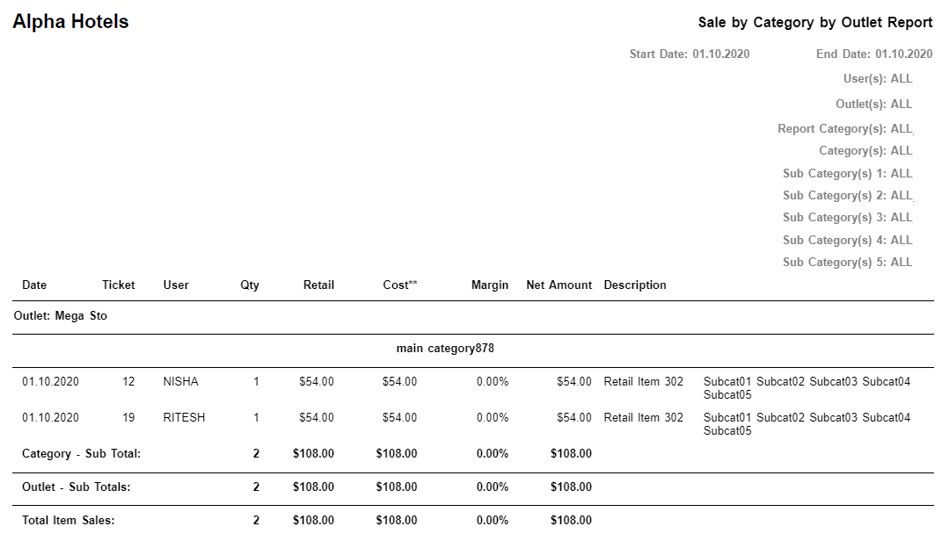
Sample Report
Report Fields
|
Field |
Description |
|---|---|
|
Date |
The date the transaction was made. |
|
Ticket |
The ticket number of the transaction. |
|
User |
The name of the user. |
|
Qty |
The number of the items. |
|
Retail |
The selling price of the item(s) based on their quantities. |
|
Cost |
The cost of the item(s). |
|
Margin |
The margin percentage of the item(s). |
|
Net Amount |
The net amount based on the quantity of item(s) ordered. |
|
Description |
The description of the item(s). |
|
Outlet |
The name of the outlet. |
|
Category- Sub Total |
The overall sum of retail, margin, and total quantity on hand for all the items for each outlet based on the categories. |
|
Outlet Total |
The overall sum of retail, margin, and total quantity on hand for all the items for each outlet. |
|
Total Item Sales |
The total sales of the item(s) based on the outlets. |